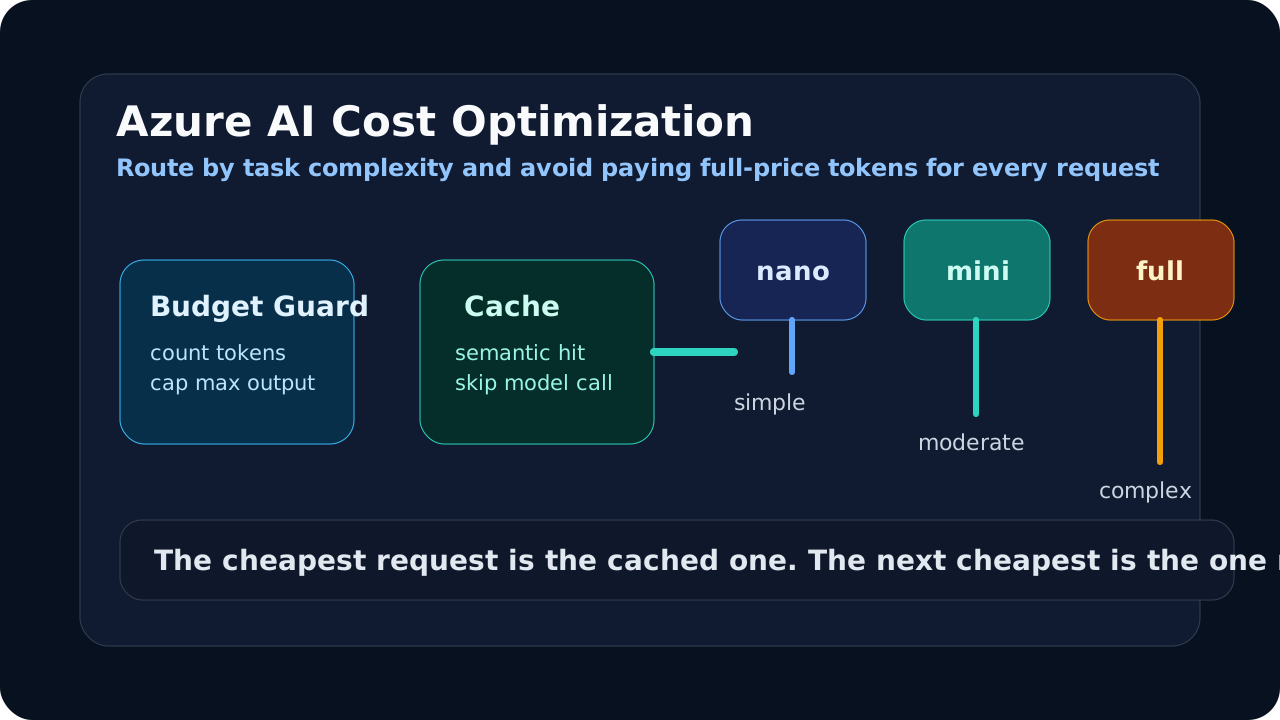
Azure AI Foundry billing is opaque until your first invoice arrives and surprises you. The cost structure is simple — you pay per token — but the levers for controlling that cost are not obvious until you understand what drives consumption. This guide covers six concrete strategies with C# code you can apply immediately.
Platform & SDK Reference (2026)
This article targets Azure AI Foundry (the evolution of Azure OpenAI Service) with the GPT-5.4 model family. All code examples use .NET 10 (LTS, supported until Nov 2028). Legacy GPT-4.x models are deprecated for new applications.
| SDK / Runtime | Version |
|---|---|
| .NET | 10 (LTS — recommended) |
| Azure.AI.OpenAI | 2.x |
| Microsoft.SemanticKernel | 1.54.0+ |
Understanding Azure AI Foundry Pricing
The most important pricing insight for .NET developers in 2026 is that the GPT-5.4 family gives you four distinct price tiers for the same provider. The gap between the top and bottom of the family makes routing decisions extremely high-value:
| Model | Input (per 1M tokens) | Output (per 1M tokens) | Ratio vs GPT-5.4 |
|---|---|---|---|
| GPT-5.4 | ~$2.00 | ~$8.00 | 1x (baseline) |
| GPT-5.4-mini | ~$0.40 | ~$1.60 | ~5x cheaper |
| GPT-5.4-nano | ~$0.10 | ~$0.40 | ~20x cheaper |
| text-embedding-3-small | ~$0.02 | n/a | — |
| text-embedding-3-large | ~$0.13 | n/a | — |
See the Azure AI Foundry pricing page for current rates — these change as models mature and OpenAI continues reducing prices over time.
The 20x price difference between GPT-5.4 and GPT-5.4-nano is the single most actionable number in AI cost optimization for 2026. GPT-5.4-nano handles classification, extraction, short-answer, and structured output tasks with high reliability. GPT-5.4-mini handles the majority of conversational and reasoning tasks. GPT-5.4 is for complex multi-step reasoning, long-form generation, and code-intensive workloads.
If 50% of your queries are simple enough for GPT-5.4-nano and another 30% are suitable for GPT-5.4-mini, only 20% of your traffic needs the GPT-5.4 tier. That routing decision alone can reduce your AI spend by 70–80% with no quality degradation on the routed queries.
Pay-as-you-go vs Provisioned Throughput (PTU). Pay-as-you-go charges per token with no upfront commitment. PTU is a monthly capacity reservation that gives guaranteed throughput at a fixed monthly price. PTU becomes cost-effective at high, consistent volumes — typically 50M+ tokens per month and above 50% utilisation of purchased capacity. Below that threshold, pay-as-you-go is cheaper and simpler.
Before you optimise cost, you need to know what you are spending. See the token counting guide for how to measure token consumption per request so you have a baseline to optimise against.
Strategy 1: Token Budgeting
In multi-tenant applications, a single user can exhaust shared Azure OpenAI quota and degrade the experience for all other users. Per-user token budgets prevent this and give you predictable cost scaling.
The pattern is straightforward: maintain a per-user daily token counter in a distributed cache, check it before each AI call, and deduct actual usage after. Use Redis (via IDistributedCache) to share state across multiple application instances:
using Microsoft.Extensions.Caching.Distributed;
using System.Text.Json;

public class UserTokenBudgetService
{
    private readonly IDistributedCache _cache;
    private const int DailyTokenBudget = 50_000; // per user per day

    public UserTokenBudgetService(IDistributedCache cache) => _cache = cache;

    public async Task<bool> TryConsumeTokensAsync(
        string userId, int tokensToConsume, CancellationToken ct = default)
    {
        var key = $"token-budget:{userId}:{DateTime.UtcNow:yyyy-MM-dd}";
        var currentBytes = await _cache.GetAsync(key, ct);
        var current = currentBytes != null
            ? JsonSerializer.Deserialize<int>(currentBytes)
            : 0;

        if (current + tokensToConsume > DailyTokenBudget)
            return false;

        var newValue = current + tokensToConsume;
        await _cache.SetAsync(
            key,
            JsonSerializer.SerializeToUtf8Bytes(newValue),
            new DistributedCacheEntryOptions
            {
                AbsoluteExpiration = DateTimeOffset.UtcNow.Date.AddDays(1)
            }, ct);

        return true;
    }
}
In your API layer, check the budget before forwarding to Azure OpenAI and return HTTP 429 when the budget is exhausted. After the AI call completes, deduct completion.Usage.TotalTokenCount from the user’s remaining quota.
Setting the right budget limit requires telemetry. Start by logging actual token usage per user per day for two weeks, then set the budget at the 90th percentile plus 20%. This accommodates normal heavy users while protecting against runaway consumption.
Strategy 2: Model Routing
Model routing is the highest-return optimisation available. The GPT-5.4 family gives you three deployment tiers to route between — nano, mini, and the flagship — each with a meaningful quality-cost tradeoff. The idea is to classify each incoming query before routing it: simple, factual, or extraction queries go to GPT-5.4-nano; balanced conversational queries go to GPT-5.4-mini; complex reasoning or long-form generation goes to GPT-5.4.
A classifier that runs on GPT-5.4-nano costs fewer than 20 tokens per classification. If it correctly routes even 40% of queries to GPT-5.4-nano, the classifier overhead is paid back many times over.
using Microsoft.SemanticKernel;
using Microsoft.SemanticKernel.ChatCompletion;

public class ModelRoutingService
{
    private readonly IChatCompletionService _nanoService;  // GPT-5.4-nano — simple tasks
    private readonly IChatCompletionService _miniService;  // GPT-5.4-mini — balanced
    private readonly IChatCompletionService _fullService;  // GPT-5.4   — complex

    public ModelRoutingService(
        [FromKeyedServices("gpt-54-nano")] IChatCompletionService nano,
        [FromKeyedServices("gpt-54-mini")] IChatCompletionService mini,
        [FromKeyedServices("gpt-54")] IChatCompletionService full)
    {
        _nanoService = nano;
        _miniService = mini;
        _fullService = full;
    }

    public async Task<string> CompleteAsync(string userQuery, CancellationToken ct = default)
    {
        // Classify using nano — cheapest possible classifier
        var tier = await ClassifyTierAsync(userQuery, ct);

        var service = tier switch
        {
            "simple"   => _nanoService,
            "moderate" => _miniService,
            _          => _fullService,
        };

        var history = new ChatHistory("You are a helpful assistant.");
        history.AddUserMessage(userQuery);

        var response = await service.GetChatMessageContentAsync(history, cancellationToken: ct);
        return response.Content ?? string.Empty;
    }

    private async Task<string> ClassifyTierAsync(string query, CancellationToken ct)
    {
        var history = new ChatHistory(
            "Classify this query as one word: " +
            "'simple' (fact lookup, short answer, classification), " +
            "'moderate' (conversational, multi-step but clear), or " +
            "'complex' (deep reasoning, code generation, long-form analysis). " +
            "Reply with only lowercase: simple, moderate, or complex.");
        history.AddUserMessage(query);

        var result = await _nanoService.GetChatMessageContentAsync(history, cancellationToken: ct);
        return result.Content?.Trim().ToLowerInvariant() switch
        {
            "complex"  => "complex",
            "moderate" => "moderate",
            _          => "simple",
        };
    }
}
Register keyed services in your DI container so each service gets the correct underlying deployment:
// Each key maps to a different Azure AI Foundry deployment
builder.Services.AddKeyedSingleton<IChatCompletionService>("gpt-54-nano",
    (sp, _) => /* kernel wired to your gpt-5.4-nano deployment */ );
builder.Services.AddKeyedSingleton<IChatCompletionService>("gpt-54-mini",
    (sp, _) => /* kernel wired to your gpt-5.4-mini deployment */ );
builder.Services.AddKeyedSingleton<IChatCompletionService>("gpt-54",
    (sp, _) => /* kernel wired to your gpt-5.4 deployment */ );
Track the routing distribution in production. If your classifier routes fewer than 30% of queries to nano or mini, either your query mix is genuinely complex or the classifier is being overly cautious. Log the routing decision alongside the query tier to spot misclassification patterns quickly.
Strategy 3: Semantic Caching as IFunctionInvocationFilter
Many production AI workloads receive the same or nearly the same queries repeatedly. A support chatbot receives variations of “How do I reset my password?” hundreds of times per day. Computing a fresh AI response each time wastes money.
Semantic caching intercepts AI function calls in Semantic Kernel using the IFunctionInvocationFilter interface. Before the real AI call executes, the filter checks whether a cached response exists for this input. If it does, the filter short-circuits the pipeline and returns the cached result:
using Microsoft.SemanticKernel;
using Microsoft.Extensions.Caching.Memory;
using System.Security.Cryptography;
using System.Text;

public class SemanticCacheFilter : IFunctionInvocationFilter
{
    private readonly IMemoryCache _cache;
    private readonly TimeSpan _cacheDuration;

    public SemanticCacheFilter(IMemoryCache cache, TimeSpan? cacheDuration = null)
    {
        _cache = cache;
        _cacheDuration = cacheDuration ?? TimeSpan.FromHours(1);
    }

    public async Task OnFunctionInvocationAsync(
        FunctionInvocationContext context,
        Func<FunctionInvocationContext, Task> next)
    {
        // Only cache prompt functions, not tool calls
        if (!context.Function.PluginName.Contains("Prompt"))
        {
            await next(context);
            return;
        }

        var cacheKey = ComputeCacheKey(context);

        if (_cache.TryGetValue(cacheKey, out string? cachedResult))
        {
            context.Result = new FunctionResult(context.Function, cachedResult);
            return; // Skip the actual AI call
        }

        await next(context);

        if (context.Result?.GetValue<string>() is string result)
        {
            _cache.Set(cacheKey, result, _cacheDuration);
        }
    }

    private static string ComputeCacheKey(FunctionInvocationContext context)
    {
        var keyInput = $"{context.Function.PluginName}:{context.Function.Name}:" +
                       string.Join(",", context.Arguments.Select(a => $"{a.Key}={a.Value}"));

        var hash = SHA256.HashData(Encoding.UTF8.GetBytes(keyInput));
        return $"sk-cache:{Convert.ToHexString(hash)[..16]}";
    }
}
Register the filter with your kernel:
builder.Services.AddMemoryCache();
builder.Services.AddSingleton<SemanticCacheFilter>();
kernel.FunctionInvocationFilters.Add(serviceProvider.GetRequiredService<SemanticCacheFilter>());
The implementation above uses exact-match caching by hashing function arguments. For true semantic caching — matching near-identical queries — you would compute embeddings of the user query, store them in a vector cache, and return a hit when cosine similarity exceeds a threshold (typically 0.92). The exact-match version shown here handles the common case where repeated queries are truly identical (same FAQ, same document reference) without the added complexity of embedding lookup.
Cache hit rates of 40-60% are achievable in support-chat and documentation-assistant scenarios. Log cache hit/miss ratios alongside estimated cost savings so you can demonstrate the value and tune the TTL.
Strategy 4: Prompt Compression
Every token in your prompt costs money. System prompts that grew incrementally over months often contain redundancy, outdated examples, and verbose phrasing that the model does not need.
Set max_tokens on every request. Without an output token cap, a model can generate an arbitrarily long response. For most use cases, 1,024 or 2,048 tokens is more than sufficient:
var options = new ChatCompletionOptions
{
    MaxOutputTokenCount = 1024, // Cap output tokens
};
var completion = await chatClient.CompleteChatAsync(messages, options);
Audit your system prompt for compression opportunities. Common sources of excess tokens:
- Lengthy few-shot examples that the model no longer needs after fine-tuning
- Verbose role definitions (“You are an extremely helpful assistant who always…”) that can be shortened to a single sentence
- Repeated instructions that appear in both the system prompt and user messages
- Full function signatures repeated every turn in tool-use conversations — use abbreviated references in multi-turn history instead
A prompt compression pass on a mature system prompt often reduces token count by 20-40% with no measurable quality degradation. Measure quality before and after using a fixed test set of 50-100 representative queries.
In multi-turn conversations, trim older messages from the context window once the conversation exceeds a threshold. Keep the system prompt and the most recent N turns. Summarizing older turns rather than dropping them preserves context while reducing token count.
Strategy 5: Ollama for Local Development
Every API call made during development, debugging, and testing costs real money. A developer running the application locally for a few hours can easily consume thousands of tokens before any production traffic arrives.
Ollama eliminates this entirely. Register it as your IChatClient for non-production environments, and your application code changes nothing — only the DI registration differs:
// Program.cs
if (builder.Environment.IsDevelopment())
{
    // Zero-cost local AI with Ollama
    builder.Services.AddOpenAIChatClient(
        modelId: "phi4-mini",
        endpoint: new Uri("http://localhost:11434/v1"),
        apiKey: "ollama");
}
else
{
    // Production Azure AI Foundry
    builder.Services.AddAzureOpenAIChatClient(
        new Uri(builder.Configuration["AzureAI:Endpoint"]!),
        new AzureKeyCredential(builder.Configuration["AzureAI:ApiKey"]!));
}
IChatClient is the same interface in both cases. Services that depend on IChatClient receive the correct implementation for their environment without any conditional logic in business code.
Phi-4-mini running locally is capable enough for most development scenarios — testing prompt logic, validating JSON output parsing, exercising the RAG pipeline. For setup instructions including model download and Ollama configuration, see the full Phi-4 local development guide.
Strategy 6: Azure OpenAI Batch API
Real-time API calls are expensive because they require reserved capacity and low-latency routing. For workloads where the response is not needed immediately, the Azure OpenAI Batch API processes requests at 50% lower cost than the real-time API.
When to use it:
- Document classification pipelines (classify 10,000 support tickets overnight)
- Bulk embedding generation for vector database population
- Automated evaluation of AI output quality (run nightly, not during user sessions)
- Offline content enrichment (generate summaries, extract entities from a corpus)
The Batch API accepts a JSONL file where each line is a self-contained request:
// Batch API — submit JSONL, get results asynchronously
// Each line in the JSONL is a full chat completion request
var batchRequest = new
{
    custom_id = "request-001",
    method = "POST",
    url = "/v1/chat/completions",
    body = new
    {
        model = "gpt-5.4-mini",  // 5x cheaper than gpt-5.4; Batch halves the cost again
        messages = new[] { new { role = "user", content = "Classify this document: ..." } },
        max_tokens = 10
    }
};
// Submit via Azure AI Foundry Batch endpoint
// Poll for completion, then retrieve results
The Batch API returns results within 24 hours. This latency is the trade-off for the cost reduction — only use the Batch API for workloads that can tolerate asynchronous processing. For document classification, embedding generation, and offline evaluation, 24-hour latency is entirely acceptable.
See the Azure AI Foundry Batch API documentation for request format details and polling patterns.
Monitoring Cost
You cannot optimize what you do not measure. The architects note above is correct: instrument before you optimize. A simple .NET Meter tracks estimated cost per request, per model, and per feature:
using System.Diagnostics.Metrics;

private static readonly Meter _meter = new("MyApp.AI.Cost", "1.0.0");
private static readonly Histogram<double> _costHistogram =
    _meter.CreateHistogram<double>("ai.request.cost.usd", "USD", "Estimated cost per request");

// April 2026 pricing (per million tokens) — GPT-5.4 family
private static readonly Dictionary<string, (double Input, double Output)> _pricing = new()
{
    ["gpt-5.4"]      = (2.00,  8.00),
    ["gpt-5.4-mini"] = (0.40,  1.60),
    ["gpt-5.4-nano"] = (0.10,  0.40),
};

// After each call — tag with model name and the feature that triggered it
var (inputRate, outputRate) = _pricing.GetValueOrDefault(modelName, (2.00, 8.00));
double estimatedCost = (completion.Usage.InputTokenCount  / 1_000_000.0 * inputRate) +
                       (completion.Usage.OutputTokenCount / 1_000_000.0 * outputRate);
_costHistogram.Record(estimatedCost, new TagList { { "model", modelName }, { "feature", featureName } });
Tag every cost metric with the model name and the application feature. After a week of production data, you will see clearly which features consume the most tokens — often it is one or two features driving 80% of cost. That is where to focus optimization effort.
Export this metric to Azure Monitor or Prometheus. Alert when daily cost exceeds a threshold. Use the feature tag to attribute cost back to product features, which turns AI cost into a conversation about feature value rather than a pure engineering expense.
Putting It Together
The six strategies are not mutually exclusive — the most cost-effective production systems implement several simultaneously:
- Instrument with cost metrics to establish baseline and identify expensive features
- Route by model tier to redirect queries to the cheapest capable model (nano/mini/GPT-5.4) — up to 20x savings per routed query
- Cache repeated queries with
SemanticCacheFilter(40-60% call reduction in high-repetition scenarios) - Budget per user to protect shared quota in multi-tenant apps
- Compress prompts to remove redundancy (20-40% prompt size reduction)
- Switch to Ollama in development to eliminate dev/test API costs entirely
- Batch non-real-time workloads at 50% discount
Applied together, these strategies routinely reduce Azure AI Foundry spend by 60-80% from an unoptimised baseline. In 2026, three-tier model routing across GPT-5.4-nano, GPT-5.4-mini, and GPT-5.4 typically delivers the largest single cost reduction — routing just 50% of queries to nano or mini at their respective price points cuts the per-token spend significantly across that traffic.
Model Selection for Cost Optimisation (2026)
Choosing the right model tier is the highest-leverage cost decision available. Here is the practical guide for .NET teams:
| Scenario | Recommended model | Why |
|---|---|---|
| All new production APIs | gpt-5.4-mini | Best cost/performance default |
| Simple classification, extraction | gpt-5.4-nano | 20x cheaper than flagship |
| Agents, reasoning chains, complex code | gpt-5.4 | Quality justifies cost |
| Bulk async processing (documents, eval) | gpt-5.4-mini + Batch API | 50% additional discount |
| Local dev and testing | Ollama (phi4-mini) | Zero cost |
Default rule: Start every new feature with gpt-5.4-mini. Only upgrade to gpt-5.4 when you have evidence (from your cost metrics) that mini is producing inadequate output for that specific workload. The savings from defaulting to mini are immediate and require no architectural change.
Cost Optimisation Tips for Azure AI Foundry
- Prefer mini models for all API endpoints —
gpt-5.4-minihandles 80% of use cases that teams initially over-provision togpt-5.4 - Cache prompt prefixes where possible — Azure AI Foundry supports prompt caching; repeated system prompts cost significantly less on subsequent calls
- Use embeddings instead of full context injection — vector retrieval via
text-embedding-3-small+ Azure AI Search is orders of magnitude cheaper than stuffing full documents into every prompt - Instrument before you optimise — without per-feature token metrics you cannot know which 20% of features consume 80% of your spend
- Set
MaxOutputTokenCounton every request — uncapped output is the most common source of unexpected cost spikes in production
Why GPT-5.4 Replaces GPT-4o for New Applications
If you are migrating from code written in 2024 or early 2025, it used GPT-4o or GPT-4o-mini. GPT-5.4 is the current standard for new .NET AI applications:
- Better reasoning per token — GPT-5.4-mini outperforms GPT-4o on most benchmark tasks at comparable cost
- Larger context window — supports significantly longer documents and conversation histories natively
- Three-tier family — nano/mini/flagship gives you granular routing options that GPT-4o did not
- Native agent support — designed for tool use and multi-step orchestration from the ground up
- Same SDK, same IChatClient pattern — update the deployment model name and nothing else changes in your C# code
The migration path is: update your Azure AI Foundry deployments to GPT-5.4-mini, update your deployment name strings, re-run your test suite. If quality is maintained (it will be for most workloads), you are done.
Further Reading
- Azure AI Foundry pricing
- Azure AI Foundry Batch API documentation
- University: Token Counting and Context Management in C# for Azure OpenAI