Platform update (April 2026): Microsoft Agent Framework is now the recommended path for new multi-agent systems. This workshop intentionally stays on Semantic Kernel because it is still the clearest way to learn the single-agent tool-use loop before you add orchestration.
What You’ll Build
A research assistant agent that can:
- Search a document collection for relevant information
- Check real-time data from external sources
- Analyze and cross-reference findings
- Produce a structured research summary
The agent decides which tools to use, in what order, and how to combine results — you provide the tools and the goal.
Project Setup
dotnet new console -n AgentWorkshop
cd AgentWorkshop
dotnet add package Microsoft.SemanticKernel
Step 1: Build the Agent’s Tools
An agent is only as useful as its tools. Create three plugins that give the agent different capabilities.
DocumentSearchPlugin.cs
This plugin simulates searching a knowledge base. In production, this would query Azure AI Search, Cosmos DB, or any document store:
using System.ComponentModel;
using Microsoft.SemanticKernel;

public class DocumentSearchPlugin
{
    private readonly Dictionary<string, List<string>> _documents = new()
    {
        ["dotnet-performance"] = [
            ".NET 10 continues dynamic PGO and runtime tuning improvements for high-throughput services",
            "Server GC now supports DATAS (Dynamic Adaptation to Application Sizes)",
            "Native AOT compilation reduces startup time by 60-80% for API workloads"
        ],
        ["semantic-kernel"] = [
            "Semantic Kernel 1.71 added enhanced auto function calling with parallel tool execution",
            "SK plugins support constructor dependency injection for service integration",
            "Memory connector for Azure Cosmos DB supports hierarchical partition keys"
        ],
        ["ai-trends"] = [
            "MCP adoption grew 400% in Q1 2026 across .NET agent implementations",
            "Microsoft Agent Framework reached GA in 2026 for production multi-agent orchestration",
            "Small Language Models (SLMs) like Phi-3 gaining adoption for edge deployment"
        ]
    };

    [KernelFunction("search_documents")]
    [Description("Search the internal knowledge base for documents matching a topic. Returns relevant excerpts.")]
    public string SearchDocuments(
        [Description("The search topic or query")] string query)
    {
        var results = new List<string>();

        foreach (var (category, docs) in _documents)
        {
            foreach (var doc in docs)
            {
                if (doc.Contains(query, StringComparison.OrdinalIgnoreCase) ||
                    category.Contains(query, StringComparison.OrdinalIgnoreCase))
                {
                    results.Add($"[{category}] {doc}");
                }
            }
        }

        return results.Count > 0
            ? string.Join("\n", results)
            : $"No documents found for '{query}'. Try broader search terms.";
    }

    [KernelFunction("list_available_topics")]
    [Description("List all available topic categories in the knowledge base")]
    public string ListTopics()
    {
        return string.Join(", ", _documents.Keys);
    }
}
DataAnalysisPlugin.cs
This plugin performs structured analysis — counting, comparing, summarizing data:
using System.ComponentModel;
using Microsoft.SemanticKernel;

public class DataAnalysisPlugin
{
    [KernelFunction("compare_metrics")]
    [Description("Compare two metrics or data points and return a structured comparison")]
    public string CompareMetrics(
        [Description("First metric or data point")] string metric1,
        [Description("Second metric or data point")] string metric2)
    {
        return $"""
            Comparison:
            - Item A: {metric1}
            - Item B: {metric2}
            - Analysis: Both metrics provided for comparative assessment.
            Note: The AI should use this structured comparison to draw conclusions.
            """;
    }

    [KernelFunction("calculate_growth")]
    [Description("Calculate percentage growth between two numeric values")]
    public string CalculateGrowth(
        [Description("The starting value")] double fromValue,
        [Description("The ending value")] double toValue)
    {
        var growth = ((toValue - fromValue) / fromValue) * 100;
        return $"Growth: {growth:F1}% (from {fromValue} to {toValue})";
    }
}
ReportPlugin.cs
The report plugin gives the agent a way to structure its output:
using System.ComponentModel;
using Microsoft.SemanticKernel;

public class ReportPlugin
{
    [KernelFunction("create_report_section")]
    [Description("Create a formatted section for a research report with a heading and bullet points")]
    public string CreateReportSection(
        [Description("Section heading")] string heading,
        [Description("Comma-separated list of key findings")] string findings)
    {
        var bullets = findings.Split(',', StringSplitOptions.TrimEntries)
            .Select(f => $"  • {f}");

        return $"""

            ## {heading}
            {string.Join("\n", bullets)}
            """;
    }

    [KernelFunction("get_timestamp")]
    [Description("Get the current UTC timestamp for report dating")]
    public string GetTimestamp()
    {
        return DateTime.UtcNow.ToString("yyyy-MM-dd HH:mm UTC");
    }
}
Step 2: Configure the Agent
The agent’s behavior is defined by its system prompt and tool configuration. Update Program.cs:
using Microsoft.SemanticKernel;
using Microsoft.SemanticKernel.ChatCompletion;
using Microsoft.SemanticKernel.Connectors.AzureOpenAI;

// Build the kernel with all plugins
var kernel = Kernel.CreateBuilder()
    .AddAzureOpenAIChatCompletion("chat-deployment",
        Environment.GetEnvironmentVariable("AZURE_OPENAI_ENDPOINT")!,
        Environment.GetEnvironmentVariable("AZURE_OPENAI_KEY")!)
    .Build();

// Register all agent tools
kernel.Plugins.AddFromType<DocumentSearchPlugin>();
kernel.Plugins.AddFromType<DataAnalysisPlugin>();
kernel.Plugins.AddFromType<ReportPlugin>();

// Configure the agent's personality and behavior
var agentSystemPrompt = """
    You are a research assistant agent. Your job is to research topics thoroughly
    using your available tools and produce structured research reports.

    When given a research task:
    1. First, check what topics are available in the knowledge base
    2. Search for relevant documents across multiple topic areas
    3. Analyze and cross-reference the findings
    4. Produce a structured report with clear sections and findings

    Always cite which document source your findings came from.
    Be thorough — search multiple topics, don't stop at the first result.
    If a search returns no results, try different search terms.

    Format your final report with clear headings and bullet points.
    """;

var chatService = kernel.GetRequiredService<IChatCompletionService>();
var history = new ChatHistory(agentSystemPrompt);

// Enable automatic tool invocation — this is what makes it an agent
var settings = new AzureOpenAIPromptExecutionSettings
{
    FunctionChoiceBehavior = FunctionChoiceBehavior.Auto()
};
Step 3: Run the Agent
Add the execution loop:
Console.WriteLine("Research Agent (type a research task, or 'exit' to quit)\n");

while (true)
{
    Console.Write("Task: ");
    var task = Console.ReadLine();
    if (string.IsNullOrWhiteSpace(task) || task.Equals("exit", StringComparison.OrdinalIgnoreCase))
        break;

    history.AddUserMessage(task);

    Console.WriteLine("\n[Agent reasoning...]\n");

    var response = await chatService.GetChatMessageContentAsync(history, settings, kernel);
    history.Add(response);

    Console.WriteLine(response.Content);
    Console.WriteLine("\n---\n");
}
Run it:
dotnet runTry these tasks:
Task: Research the latest .NET performance improvements and AI trends, then write a summary reportWatch what happens. The agent will:
- Call
list_available_topicsto see what’s available - Call
search_documentswith “dotnet-performance” - Call
search_documentswith “ai-trends” - Use
create_report_sectionto structure its findings - Synthesize everything into a coherent response
The agent made these decisions autonomously based on its instructions and tool descriptions.
Step 4: Watch the Reasoning Loop
To see exactly what the agent does at each step, add a filter that logs tool calls:
using Microsoft.SemanticKernel;

public class ToolLoggingFilter : IAutoFunctionInvocationFilter
{
    public async Task OnAutoFunctionInvocationAsync(
        AutoFunctionInvocationContext context, Func<AutoFunctionInvocationContext, Task> next)
    {
        Console.ForegroundColor = ConsoleColor.DarkCyan;
        Console.WriteLine($"  → Calling: {context.Function.Name}({FormatArgs(context.Arguments)})");
        Console.ResetColor();

        await next(context);

        Console.ForegroundColor = ConsoleColor.DarkGreen;
        var resultPreview = context.Result.ToString();
        if (resultPreview?.Length > 120)
            resultPreview = resultPreview[..120] + "...";
        Console.WriteLine($"  ← Result: {resultPreview}");
        Console.ResetColor();
    }

    private static string FormatArgs(KernelArguments? args)
    {
        if (args == null) return "";
        return string.Join(", ", args.Select(a => $"{a.Key}=\"{a.Value}\""));
    }
}
Register the filter before running:
kernel.AutoFunctionInvocationFilters.Add(new ToolLoggingFilter());Now when you run a task, you’ll see each tool call the agent makes — the reasoning/action loop visible in your terminal:
Task: Research AI trends and .NET performance, compare them

[Agent reasoning...]

  → Calling: list_available_topics()
  ← Result: dotnet-performance, semantic-kernel, ai-trends
  → Calling: search_documents(query="AI trends")
  ← Result: [ai-trends] MCP adoption grew 400% in Q1 2026...
  → Calling: search_documents(query="dotnet-performance")
  ← Result: [dotnet-performance] .NET 9 introduced dynamic PGO improvements...
  → Calling: compare_metrics(metric1="MCP adoption 400% growth", metric2=".NET 9 15-20% throughput...")
  ← Result: Comparison: - Item A: MCP adoption 400% growth...

[Final synthesized response with all findings...]
Step 5: Adding Guardrails
Production agents need boundaries. Add a termination filter to prevent infinite tool loops:
public class GuardrailFilter : IAutoFunctionInvocationFilter
{
    private int _callCount;
    private const int MaxCalls = 15;

    public async Task OnAutoFunctionInvocationAsync(
        AutoFunctionInvocationContext context, Func<AutoFunctionInvocationContext, Task> next)
    {
        _callCount++;

        if (_callCount > MaxCalls)
        {
            Console.WriteLine($"  ⚠ Tool call limit ({MaxCalls}) reached. Terminating.");
            context.Terminate = true;
            return;
        }

        await next(context);
    }
}
Register both filters:
kernel.AutoFunctionInvocationFilters.Add(new ToolLoggingFilter());
kernel.AutoFunctionInvocationFilters.Add(new GuardrailFilter());
How This Agent Pattern Works
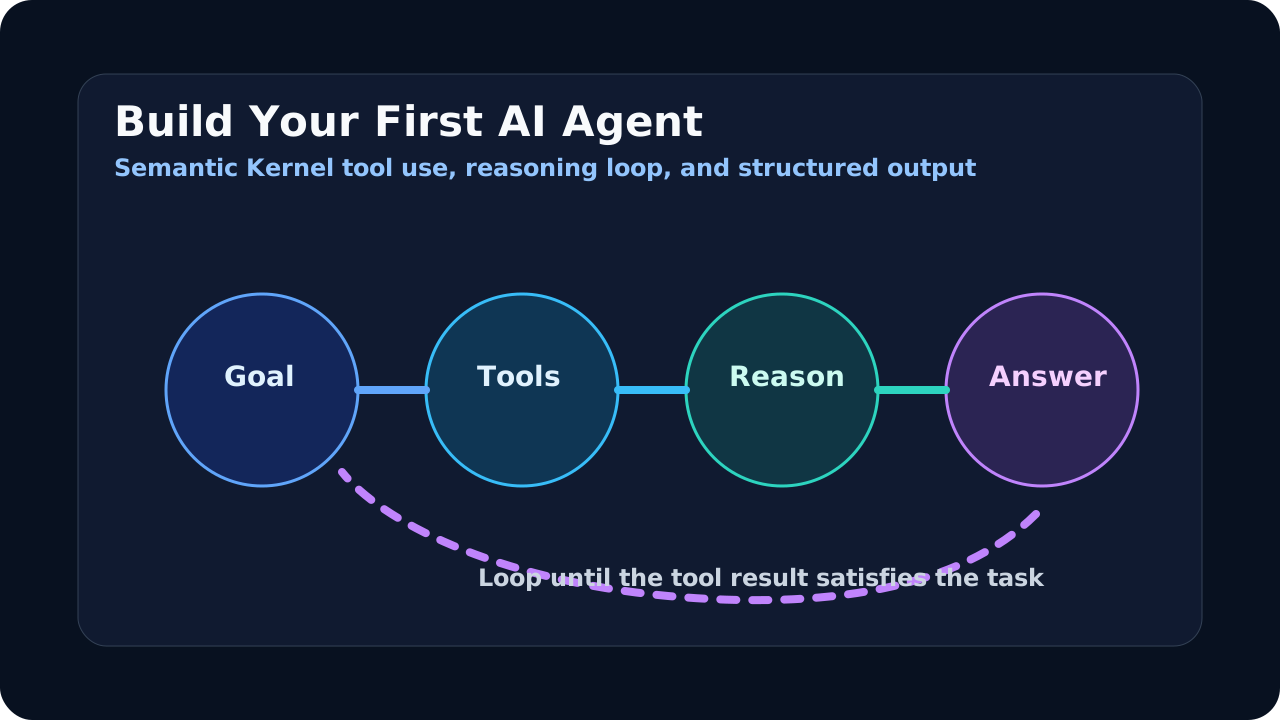
What you built follows the ReAct (Reasoning + Acting) pattern:
- Reasoning — The LLM reads the task and its tool descriptions, then decides what information it needs
- Acting — It calls a tool to gather that information
- Observing — It receives the tool result and incorporates it into its context
- Looping — It reasons again: “Do I have enough information? No → call another tool. Yes → produce the final response.”
This loop continues until the agent determines it has sufficient information to answer, or until it hits a termination condition (max turns, explicit stop).
SK handles the entire loop automatically when you set FunctionChoiceBehavior.Auto(). Each iteration is a round-trip to the LLM.
From Here to Agent Framework
Everything you built transfers to Microsoft Agent Framework. The plugins don’t change. The function descriptions don’t change. What Agent Framework adds:
- Multi-agent coordination — Multiple agents working together (this workshop builds one agent)
- Orchestration patterns — Sequential, concurrent, handoff, group chat
- MCP integration — External tool servers via protocol
- Checkpointing — Resume long-running agent workflows
When you’re ready for multi-agent systems, see Microsoft Agent Framework: Complete Guide and Build a Multi-Agent System.
Next Steps
- AI Agent Architecture for .NET Developers — Understand the theory behind what you just built
- Semantic Kernel Plugins: Build Reusable AI Tools — Master the plugin/tool system
- Model Context Protocol Guide — Connect your agent to external tools via MCP